
It is said that 70 to 80 percentage of the end-user response time is spent on the front-end. A major portion of this time is exhausted on downloading all the external components in a web page including, stylesheet, images, scripts, flash etc. An extra HTTP request adds 200+ milliseconds to a page (worldwide average).
Since most of today’s browsers limit about 3 or 4 parallel requests at a time, a page with so many external references can cause the requests to get queued up. This may eventually cause the page loading time to increase. In short, the fewer files the web browser has to fetch that much faster the site loads. It’s as simple as that.
What is CSS sprite?
CSS sprites can be termed as a method for reducing the number of image requests to a web page by combining multiple images into a single image, and display the desired segment using CSS background-image and background-position properites. Now that almost all major browsers started supporting CSS background-image and background-position properties, CSS sprites are getting more significance.
Cool Sprites – Free Pure CSS menu for download
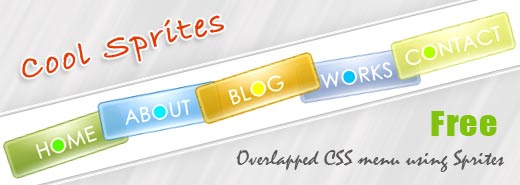
Here I am presenting a cool overlapped pure CSS menu created using CSS sprites. This is an initial draft version, so far I have checked it only in Firefox 3.5, IE 7, Chrome 3.0 & Opera 9.02 and it looks fine. If anyone of you finds any issues in any other browsers, please lemme know. Cool sprites is a pack of four different versions of the same menu. The photoshop source is also available for download, so that you can customize it as per your need. Since this menu is largely dependent on the background image, you need to customize the image to alter the link label, color, size etc.
Cool Sprites – LIVE PREVIEW
Sample HTML Code
1 2 3 4 5 6 7 8 9 | <div class="navi1"> <ul> <li class="sm1"><a href="#"></a></li> <li class="sm2"><a href="#"></a></li> <li class="sm3"><a href="#"></a></li> <li class="sm4"><a href="#"></a></li> <li class="sm5"><a href="#"></a></li> </ul> </div> |
Sample CSS Code
1 2 3 4 5 6 7 8 9 10 11 12 13 14 15 16 17 18 19 20 21 22 23 24 25 26 27 28 29 30 31 32 33 34 35 36 37 38 39 40 41 42 43 44 45 46 47 48 49 50 51 52 53 54 55 | .navi1 { display:block; height:72px; margin:0 auto; position:relative; width:525px; } .navi1 ul { float:none; list-style-image:none; list-style-type:none; margin:3px 0; } .navi1 ul li { background-image:url(tab-1.png); background-repeat:no-repeat; float:left; height:72px; margin:0px; padding-top:5px; position:absolute; } .navi1 ul li a { display:block; height:100%; width:100%; } .navi1 ul li.sm1 { background-position:0 0; left:0px; width:125px; } .navi1 ul li.sm2 { background-position:-125px 0; left:100px; width:124px; } .navi1 ul li.sm3 { background-position:-249px 0; left:200px; width:124px; } .navi1 ul li.sm4 { background-position:-373px 0; left:300px; width:125px; } .navi1 ul li.sm5 { background-position:-498px 0; left:400px; width:126px; } .navi1 ul li:hover { z-index:1000; } .navi1 ul li.sm1:hover { background-position:0 -75px; } .navi1 ul li.sm2:hover { background-position:-125px -75px; } .navi1 ul li.sm3:hover { background-position:-249px -75px; } .navi1 ul li.sm4:hover { background-position:-373px -75px; } .navi1 ul li.sm5:hover { background-position:-498px -75px; } |
Sample CSS Sprite Image

Download Cool Sprite
Dovwnload HTML, CSS, PNG files
[download id=”3″]
[ad#ad-3]
Download Photoshop PSD
[download id=”4″]
You can use these menus for personal and commercial projects at free of charge. What I only expect in return is your comments and backlinks, if you like it. You are not allowed to sell or redistribute these menus anywhere else. If you like to share cool sprites please link to this article.
Do not provide the direct download link nor upload these menus onto other servers for your own share, without my permission. If you want to spread the words, just link to this article.

Cool Sprites – Free overlapped CSS menu using CSS Sprite by Deepu Balan is licensed under a Creative Commons Attribution 2.5 India License. Based on a work at deepubalan.com.
About The Author

Beautiful compilation.. Love the menu… Thanks
Fasntastic styling and effect, I love this. Thanks Deepu for sharing.
-Karen
Just about all great concepts. I will be social bookmarking this article, certainly I will acquire writers-block.
It is great to see this type of work.But will be better if whole thing is done without photoshop
really good i like it very much very useful information about css
Lovely . . . Thanks a lot
This is good, Thanks!
Very cool – thanks for posting this Deepu. I’ve been soaking up everything I can about CSS sprites after reading about them somewhere a few days ago, and this will give me something to play with a bit.
They’re working fine for me on Safari 5.1 and they even work on my iPhone, just without the ability to hover over the different menu buttons. Clicking on the samples seems to work just fine though.
Read about your menu in another website.
Could not resist the temptation to view it first hand in your site.
Awesome creation.
This is the first time I have heard of Cool Sprites. Now, I am thinking of downloading it after reading your post.
I’m viewing this page in IE8 now and the examples work fine. They’re really cool. I’m not very good at coding but I might try this on my site. Thanks!
This is not working for me in IE8 as well. It may be an issue with my PC though. I will try on my work PC and get back to you.
TOP Idee! TOP Job!
ich wusste gar nicht, das man Sprites derart gut für ein Menue einsetzen kann. Kurze Ladezeiten und ein außergewöhnliches Aussehen, das ist mal etwas neues.
I tried it in IE8. But it is not working. Tell me some suggestions .
It should work in IE8. Please crosscheck your IE version again…
cool menu collections! i’ll tweet this one. awesome!
Thanks…. this is very very cool..
This is an incredible post. Its amazing to see what CSS3 can do , at the same time its sad a lot of customers still want IE support which sucks at CSS3 big time.
I am taking the liberty of adding this article to my CSS aggregator site. Hope you dont mind. 🙂
Keep posting stuff like this i really like it
Pretty sweet menus. Keep up the great work!
Nice ressource, thank you!
Woooow! Wonderful! i like it.
@ All
Thank you for your inspiring comments, I am really glad that you all liked it.
@ Dan
Yeah I know there are some look n feel issues when my blog is browsed through IE6. Since my blog’s browser statistics shows only 0.6% visits through IE6 till date, I prefer not to bother much about that fast dying browser. Even giants like Google and Facebook already stopped supporting IE-6 and a country like UK started thinking about imposing a ban on IE6.
In-fact Its purely a personal choice to support or not support IE6, by considering all aspects like your target audience, visitor’s browser statistics etc…
BTW Thanks for dropping by 🙂
Your website don’t work properly in IE6 and the menu also has severe weaknesses as concerns png view. I was searching for this same sprite overlapped menu for compliance but realise it =don'[t work in IE6, though not so used but the task assigned required it to chek for all browsers compatibility
this is an amazing menu! Thanks for sharing!!
hi there, thanks for sharing this cool sprites
Keep posting stuff like this i really like it
very beautiful
thanks
i am with you
Nice work and in the same time very useful tips. Can’t wait to use it in one of my projects. Keep up the good work!
I have to say, CSS sprite based menus are far from a new thing to me(and the pain you noted about changing the labels) however your implementation is great.
I can honestly say I’ve never tried using absolute positioning to overlap the elements like you have, but I love the effect.
Thanks for sharing your method
@Deepu thank you..
@joyoge Thanks a lot.
This can be integrated to wordpress mannually by simply adding the html code to the theme file (ie: header.php) and then paste the curresponding CSS code to the theme CSS file. You also need to copy the curresponding image to the images folder. Thats all. 🙂 Do lemme know if there are any issues while doing this.
-Deepu
very beaituful, thanks for share. how to integrate this in to wordpress?
Genius stuff! I love playing with CSS but could never make anything with my nav like you did.. gonna give this a try on my personal blog and tweak it..
Very good work. 🙂
Awesome Effect! I love this too. Great job! good tut+
I so love this – its simply beautiful ! Now you have given me a new homework assignment to keep me busy:D , but I love playing with code ( even if Im a newbie at everything ). I can say I enjoy code more than Design . I’m so addicted now 😀
Thank you for this Deepu !
M.