
Have you ever felt the need for holding an embedded image inside an HTML file, without referring to an external image file? Personally I felt like so many occasions, where the need for a completely self contained HTML page, with all its supporting images embedded within that page itself. This may seem pointless in normal situations, but it can prove very useful when we want to make a standalone page, that we can pass on to other people. We give them just one HTML file. They do not even need to unpack anything, they can simply open the file in their browser, and all the images and embedded objects are immediately displayed. They can do this even without an internet connection.
Below you can see two images first one is included in the traditional way by referring to an external file, and the later by using data URI.


Try right-clicking the above images and check the file location in the properties panel. You can see the difference.
With Data URI (Uniform Resource Identifiers) we can easily do this.
[ad#ad-3]
What is Data URI Scheme?
Data URI scheme defined in IETF standard RFC 2397, as an URI scheme that allows inclusion of small data items inline, as if they were being referenced to as an external resource. They tend to be far simpler than alternative inclusion methods, such as MIME with cid: or mid: As per the wording in the RFC, data: URIs are in fact URLs, although they do not actually locate anything.
How Data URI Scheme works?
In HTML normally we use an IMG tag like below to refer/link an external image.
1 | <img src="mages/myGravatar.gif" alt="" /> |
While rendering the page, the browser sends separate individual HTTP requests for each external resources used in that page, tying up valuable network resources. Since most of today’s browsers limit about 3 or 4 parallel requests at a time, a page with so many external references can cause the requests to get queued up. This may eventually cause performance degradation.
With data URIs the same IMG tag can be represented like below.
1 2 3 4 5 6 7 8 9 10 11 12 | <img src="data:image/gif;base64,R0lGODlhXgBDAIAAAAAAAP///yH 5BAAAAAAALAAAAABeAEMAAAL/jI+py+0Po5y02ouz3rw3AB6hR3oggKCG WrbaCYenS1vxjaNszSf5D+sJRcDiUFhMxo4lpTPI3Dynu6iNirVesVMthZv1S sAjpziihKTPj+TEyP64v784Y16p2xXwS27P9/ciCLiC03ETULV3iJhYmDLjsNg mCblCFEn5ZnmpqbPk1+lpqNJINPpJijqiGPa5aVcGGxa6islKBnW7YLbGe9fXx 7j1WHoKOMuZqrfaKgUUt5kqiixWpnMcu7xr1QmKTV3cXX0a9OzaaoyGro2 LoSdDngkuLjefMthoeg4Vfb/DVqB23NLtm/FkUih89bZVqhVPmQ9t9VxRJMh OlzlspRkf/ctDxaAxcMc6SkpkT6FGSwKpdfO3EJKlbBUDVyJ8aYuWjx17lyXC 0zPoLFwErrYxQfDj7SM4tQZbI3TqQRliqSK9ajSnCGzkqlk8t+rsM3uke2X08Q wsGflpXTkEM2YkMDePUxYlw5dXmmbwrTati8nNXOAKgW4BC28uHis3RUK kttLx1H/qCt7F+QirYjFrq2sljLSrQ3xgIbr2G1itCAKAAA7" alt="myGravatar.gif" /> |
In CSS.
1 2 3 4 5 6 7 8 9 10 11 12 | background-image: url("data:image/gif;base64,R0lGODlhXgBD AIAAAAAAAP///yH5BAAAAAAALAAAAABeAEMAAALjI+py+0Po5y02ouz3rw3A B6hR3oggKCGWrbaCYenS1vxjaNszSf5D+sJRcDiUFhMxo4lpTPI3Dynu6iN irVesVMthZv1SsAjpziihKTPj+TEyP64v784Y16p2xXwS27P9/ciCLiC03ET ULV3iJhYmDLjsNgmCblCFEn5ZnmpqbPk1+lpqNJINPpJijqiGPa5aVcGGxa6 islKBnW7YLbGe9fXx7j1WHoKOMuZqrfaKgUUt5kqiixWpnMcu7xr1QmKTV 3cXX0a9OzaaoyGro2LoSdDngkuLjefMthoeg4Vfb/DVqB23NLtm/FkUih89 bZVqhVPmQ9t9VxRJMhOlzlspRkf/ctDxaAxcMc6SkpkT6FGSwKpdfO3EJ /KlbBUDVyJ8aYuWjx17lyXC0zPoLFwErrYxQfDj7SM4tQZbI3TqQRliqSK9 ajSnCGzkqlk8t+rsM3uke2X08QwsGflpXTkEM2YkMDePUxYlw5dXmmbwr Tati8nNXOAKgW4BC28uHis3RUKkttLx1H/qCt7F+QirYjFrq2sljLSrQ3xgIb r2G1itCAKAAA7"); |
[ad#ad-1]
Advantages of Data URI
- HTTP request and header traffic is not required for embedded data, so data URIs consume less bandwidth whenever the overhead of encoding the inline content as a data URI is smaller than the HTTP overhead. For example, the required base64 encoding for an image 600 bytes long would be 800 bytes, so if an HTTP request required more than 200 bytes of overhead, the data URI would be more efficient.
- For transferring many small files (less than a few kilobytes each), this can be faster. TCP transfers tend to start slowly. If each file requires a new TCP connection, the transfer speed is limited by the round-trip time rather than the available bandwidth. Using HTTP keep-alive improves the situation, but may not entirely alleviate the bottleneck.
- When browsing a secure HTTPS web site, web browsers commonly require that all elements of a web page be downloaded over secure connections, or the user will be notified of reduced security due to a mixture of secure and insecure elements. HTTPS requests have significant overhead over common HTTP requests, so embedding data in data URIs may improve speed in this case.
- Web browsers are usually configured to make only a certain number (often two) of concurrent HTTP connections to a domain, so inline data frees up a download connection for other content.
- Environments with limited or restricted access to external resources may embed content when it is disallowed or impractical to reference it externally. For example, an advanced HTML editing field could accept a pasted or inserted image and convert it to a data URI to hide the complexity of external resources from the user.
Disadvantages of Data URI
- Data URIs are not separately cached from their containing documents (e.g. CSS or HTML files) so data is downloaded every time the containing documents are redownloaded.
- Data URIs are not separately cached from their containing documents (e.g. CSS or HTML files) so data is downloaded every time the containing documents are redownloaded.
- Content must be re-encoded and re-embedded every time a change is made.
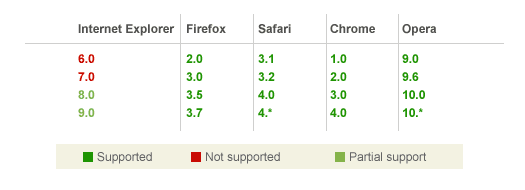
- Internet Explorer beyond version 7 lacks support and version 8 limits data URIs to a maximum length of 32 KBs.
- Base64 encoded images are roughly 33% larger than their binary equivalent. However, this is mitigated slightly if the HTTP server compresses the response using HTTP’s Content-Encoding header.
- Data URIs makes it more difficult for security softwares to filter content.
Format
1 | data:[<mime type>][;charset=<charset>][;base64],<encoded data> |
The encoding is indicated by ;base64. If it’s present the data is encoded as base64. Without it the data (as a sequence of octets) is represented using ASCII encoding for octets inside the range of safe URL characters and using the standard %xx hex encoding of URLs for octets outside that range. If is omitted, it defaults to text/plain;charset=US-ASCII. (As a shorthand, the type can be omitted but the charset parameter supplied.)
Conversion Tools
Online Conversion – Base64 converter for embedded URI Images from A Blue Star
Clipboard Observer – a free java tool for converting PNG files to URI scheme easily (You need Java JRE or JDK environment to run this application)
Data URI Maker for UNIX from Sveinbjorn Thordarson’s Website (standard command line tool script)
Data URI Maker for Mac OS X from Sveinbjorn Thordarson’s Website
CSSEmbed – Automatic data URI embedding in CSS files, a tool to automatically embed images into CSS files as data URIs by Nicholas C. Zakas
[ad#ad-3]
Browser Compatibility
Conclusion
Like most of us believes, URIs are not just a way to embed images inside an HTML or CSS file, there is nothing here which is image-specific. We can encode and embed any type of files like fonts CSS or even HTML itself. Data URI is a beautiful concept in the Web, and is going to get more momentum soon once IE gives full support. But it’s a good sign that IE started giving partial support from version 8.0 onwards. For the time being, it seems that they are best suited to performance-related tasks.
Further reading
http://en.wikipedia.org/wiki/Data_URI_scheme
http://www.w3.org/Addressing/URL/URI_Overview.html
http://www.websiteoptimization.com/speed/tweak/inline-images/
http://www.nczonline.net/blog/2009/10/27/data-uris-explained/
About The Author

@ Sheridian Berry. I, too was assigned with the task of studying Data URI schemes in school / college. I believe that computer-related topics will grow exponentially in the next decade, as far as new job / professions are concerned. The entire field of data security alone has right now unlimited growth potential.
Thanks for posting this. I am actually studying Data URI scheme as my professor assigned me to discuss this topic to the class.
Hello i am new on this board i hope i will be able to help & contribute here because i have learned allot myself.
Thank you
[URL=http://deelowdesigns.com][B]web design essex[/B][/URL]
Super-Duper site! I am loving it!! Will come back again – taking your feeds too now, Thanks.
Your blog keeps getting better and better! Your older articles are not as good as newer ones you have a lot more creativity and originality now keep it up!
Very informative and detailed post. Thanks for sharing.
Thanks for those links Paul. Thanks a lot for bringing CSSEmbed to my attention, It’s really a cool tool and I have updated this post by adding CSSEmbed download link under ‘Conversion Tools’. I am planning another detailed post on embedding other major types like fonts, HTML, CSS etc. I will definitely be mentioning about CSSEmbed in detail there. Personally I do not like long-scrolling blog posts in plain text, that’s the main reason I focused more on ‘basic URI concept using images’ alone in this post.
Solid writeup but you’d be remiss to not bring up CSSEmbed
http://github.com/nzakas/cssembed
http://www.stevesouders.com/blog/2009/11/16/cssembed-automatically-data-uri-ize/
Also Divya’s post has some good stuff, though similar:
http://nimbupani.com/using-data-uris-in-css.html